
True shape nesting
Parts are placed by their real outlines, not as rectangles; small parts fit into the holes of larger ones.
For laser cutting workshops
ZekNest rotates the parts in your DXF drawings by their real outline instead of their bounding box, places small parts inside holes and fits everything on as few sheets as possible. No installation; the first 20 nesting runs are free and full-featured.
Latest version: 0.4.1 · Windows 10/11
Campaign · Early supporter price
Left at this price: 5 · Then: 59,99 TL
0 of 50 spots taken · Campaign ends: Oct 31, 2026
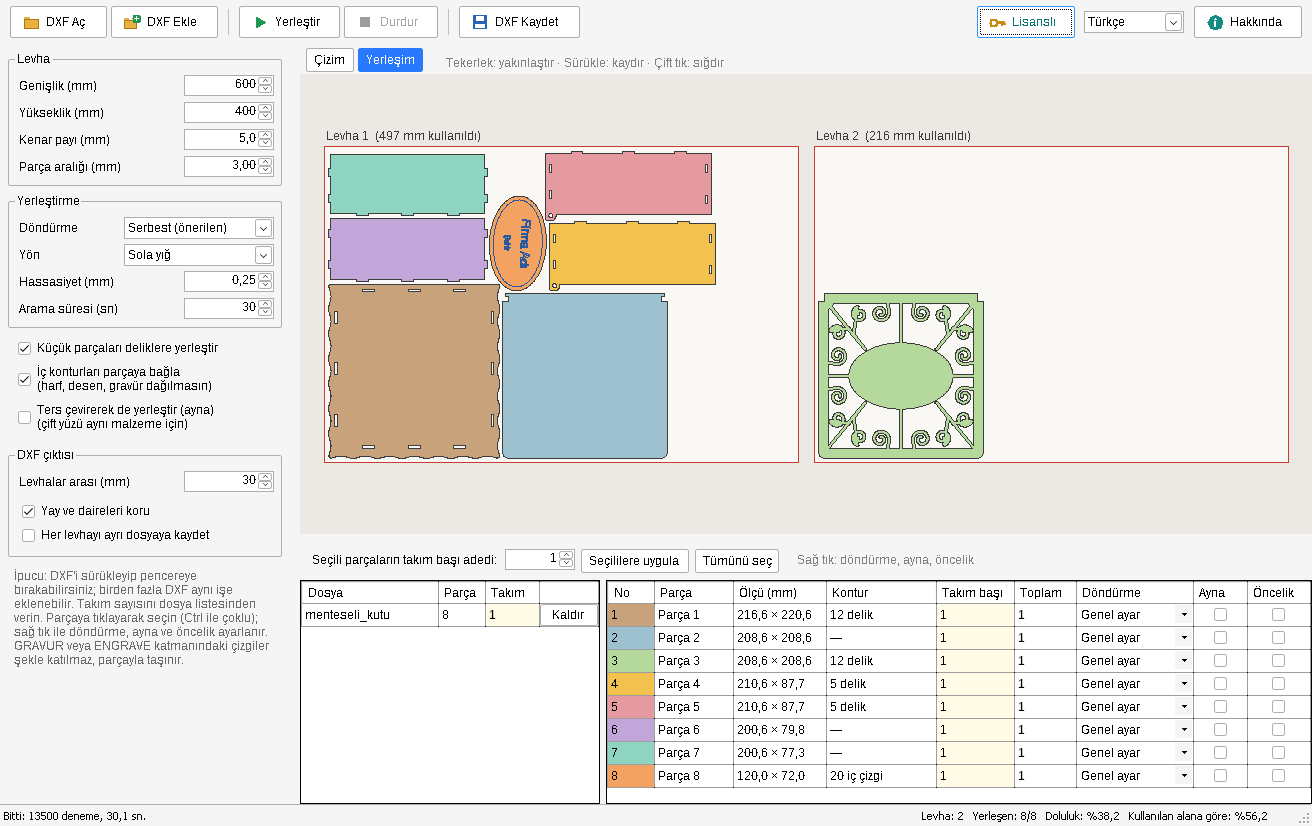
Nesting is arranging the parts to be cut on a sheet with as little empty space as possible. In laser cutting, material is usually the most expensive part of a job; cutting the same order with one sheet less goes straight to your profit.
Manual layout is slow and depends on experience. Simple nesting programs treat parts as rectangles, so the space around L, U or round parts is wasted. True shape nesting uses the actual outline of each part, slides parts into each other's recesses and uses the inside of frame-like parts.
Drag and drop DXF files saved from CorelDRAW, Illustrator, AutoCAD or Inkscape. You can add several products to the same job.
Enter the number of sets for each product, the sheet size, edge margin and part spacing. You can restrict rotation for grained material.
ZekNest places the parts in seconds and keeps searching for a better layout. Stop whenever the result is good enough.
The result is saved as a clean DXF with arcs preserved and goes straight to cutting in LightBurn, RDWorks or CorelDRAW.
Parts are placed by their real outlines, not as rectangles; small parts fit into the holes of larger ones.
Besides 90-degree steps, each part is tried at the angle of its tightest bounding box plus a few degrees of fine tuning.
Add different DXF files to the same job and set the number of sets for each product.
No rotation for wood grain, priority parts and flipping for double-sided material.
Arcs and circles are preserved; every laser program reads the AutoCAD R12 output.
Letters, patterns and engraving layers inside a part are bound to it and never scattered.
A single file, no .NET installation needed; it even runs from a USB stick.
Once the license is verified, the program works without a connection for up to 10 days.

ZekNest is tested with real product drawings cut in our workshop in Karaman, Turkey: hinged boxes, heart boxes, slot-together pen holders, name plates and desk organisers.
| Feature | Manual layout | Rectangle nesting | True shape (ZekNest) |
|---|---|---|---|
| Speed | Slow, minutes to hours | Fast | Fast, seconds |
| Use of recesses and holes | Depends on the user | None | Yes, automatic |
| Rotation | Manual | Usually 90° | 90°, part-specific angle and fine tuning |
| Spacing and margin check | By eye | By rectangle | By real shape, measured |
ZekNest reads and writes DXF, so you keep your drawing and cutting software.
| Operating system | Windows 10 or Windows 11, 64-bit |
|---|---|
| Memory | 4 GB, 8 GB recommended for jobs with many parts |
| Processor | Calculation runs in parallel on multi-core processors |
| Installation | None; a single exe file (about 70 MB) |
| Internet | Needed for activation, then offline for up to 10 days |
One-time payment. No subscription.
Campaign · Early supporter price
Left at this price: 5 · Then: 59,99 TL
0 of 50 spots taken · Campaign ends: Oct 31, 2026
Payment is taken in Turkish lira (TRY); your card issuer converts it at its own rate.
The first 20 nesting runs are free and full-featured. After that the program keeps opening in limited mode; DXF export and all features need a one-time license.
It opens DXF files: lines, arcs, circles, polylines with bulges, ellipses and splines. Just save your CorelDRAW, Illustrator or AutoCAD drawings as DXF.
One license works on one computer at a time. When you change computers you move the license yourself with a code sent to your e-mail; you have 3 transfers per year.
Yes. Once the license is verified, the program works offline for up to 10 days and re-verifies automatically when a connection is available.
All versions released within one year of purchase are free. After that the program keeps working; you can extend the period for new versions.
No. All calculation happens on your computer. Only license verification, device details and anonymous usage counts such as the number of nesting runs are sent.
Download it, try it with your own drawings and buy a license if you like the result.